
How to Start a Blog in 2024: A Beginner’s Guide
Heads up, folks! We are reader-supported. Some of the links are affiliate links. We may earn a commission If you click and make a purchase; see our privacy policy for details.
I wasn’t always a blogging pro. I started with the same spark you might have right now, but the technical jargon and overwhelming advice online left me feeling lost when I wanted to start a blog. That’s why I created this guide – to break down the process of starting a blog, especially for beginners like the one I once was.
Here, you’ll find clear, actionable steps, minus the confusing tech talk. We’ll cover everything from finding your niche to crafting captivating content and attracting an audience.
Key Points:
By the end of this post, you’ll be able to:
- Find your niche and target audience.
- Choose the perfect blogging platform for your needs.
- Craft a catchy name and design a beautiful blog.
- Write engaging content that keeps your readers coming back for more.
- Promote your blog and reach a wider audience.
Finding Your Voice: Choosing a Niche
The first step on your blogging journey is figuring out what you want to talk about. This might sound obvious, but it’s quite important. When starting a blog, you have to understand that your niche is your sweet spot, the specific area of focus that will attract your ideal audience.
Think of it like this: if you open a restaurant, you wouldn’t try to serve everything under the sun, right? You’d probably choose a specific cuisine, like Italian or Mexican, because that allows you to cater to a particular set of tastes and preferences.
The same goes for blogging. By choosing a niche, you become an expert in a defined area. This allows you to:
- Connect with your audience on a deeper level: When you focus on a specific topic, you can delve deeper into the subject matter, providing valuable insights and information that your readers won’t find anywhere else.
- Stand out from the crowd: The blogosphere is a crowded space. By choosing a niche, you avoid getting lost in a sea of general content.
So, how do you find your niche? Here are a few tips:
- Brainstorm your passions and interests: What are you naturally curious about? What are you good at? Is there a topic you could talk about for hours on end?
- Consider your expertise: Do you have any special knowledge or skills that you could share with others? This could be anything from gardening tips to coding tricks.
- Look for gaps in the market: Are there any topics you’re interested in that don’t seem to be well-covered by other bloggers? This could be your chance to carve out your own space in the online world.
While it’s tempting to write about everything that interests you, a more focused approach will be more effective in the long run. For example, instead of a blog about “healthy living,” you could focus on “plant-based recipes for busy families.”
To identify trending topics within a niche, you can use Google Trends. This free tool lets you see what people are searching for online, giving you valuable insights into current interests and potential content gaps.
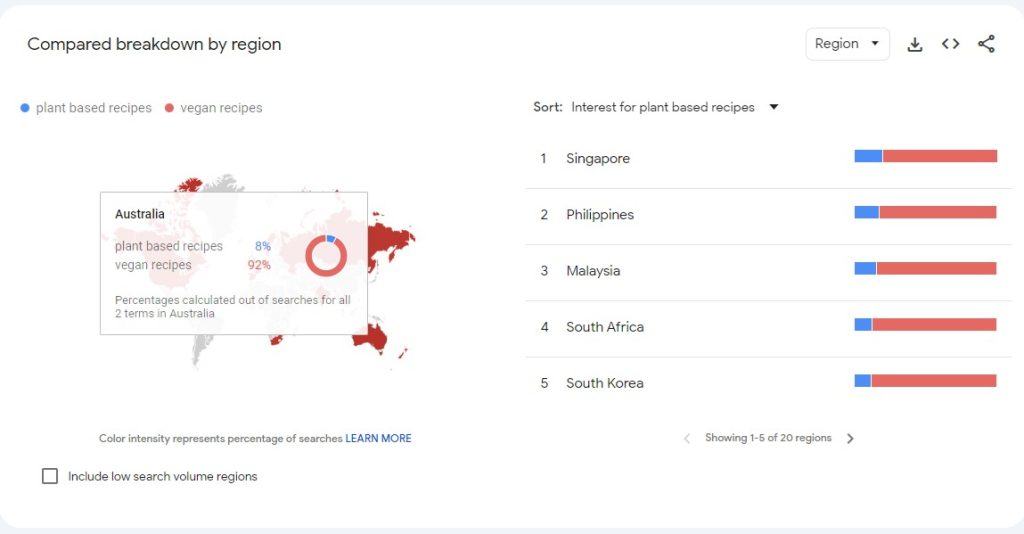
Once you have a general idea of your niche, consider using AI tools like ChatGPT or me, Gemini, to brainstorm even more specific and creative content ideas. We can help you generate catchy titles, outline blog posts, and even suggest different angles to approach a topic.
For this example, I used the prompt “Combining my interest in [your area of interest] with current trends, suggest sub-niches within this field with high growth potential. Provide some example blog post titles for each sub-niche.”
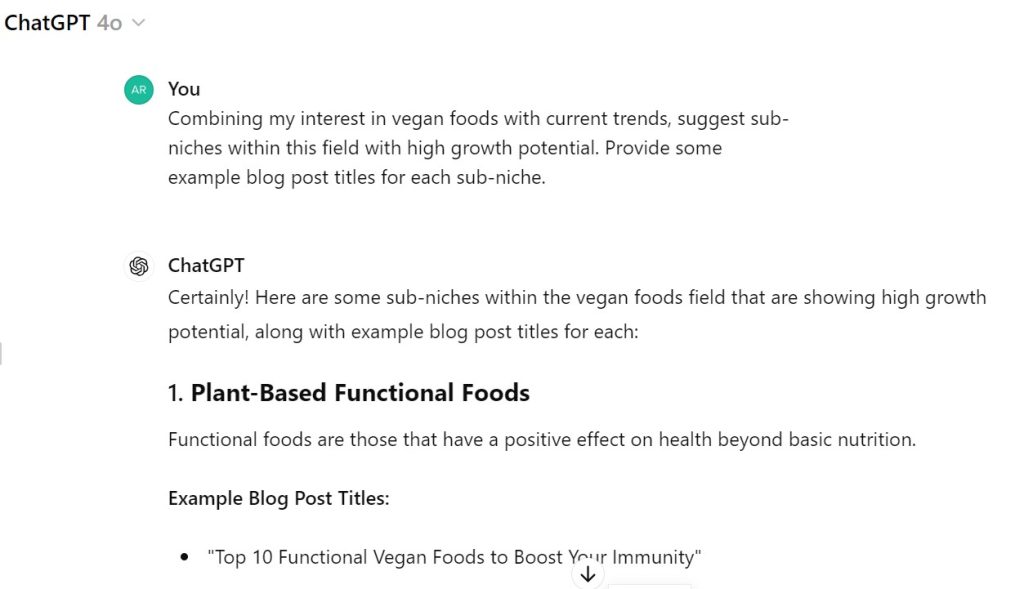
By combining your own interests with insights and AI assistance, you can develop a targeted blog concept that resonates with your audience and sets you up for long-term success.
Building Your Home: Choosing a Blogging Platform
Now that you’ve identified your niche, it’s time to find the perfect platform to build your blog on. Think of this platform as the foundation of your house. It’s where you’ll create your content, customize the look and feel, and ultimately, share your voice with the world.
There are many different blogging platforms out there, each with its own set of features and functionalities. Here’s a breakdown of three popular options for beginners wanting to start a blog:
- WordPress: Often considered the king of blogging platforms, WordPress offers a ton of flexibility and customization options. It’s a self-hosted platform, which means you’ll need to register a domain name and secure web hosting (don’t worry, we’ll cover that in a bit!). While WordPress offers a bit of a learning curve, it’s incredibly powerful and allows you to grow your blog alongside your needs.
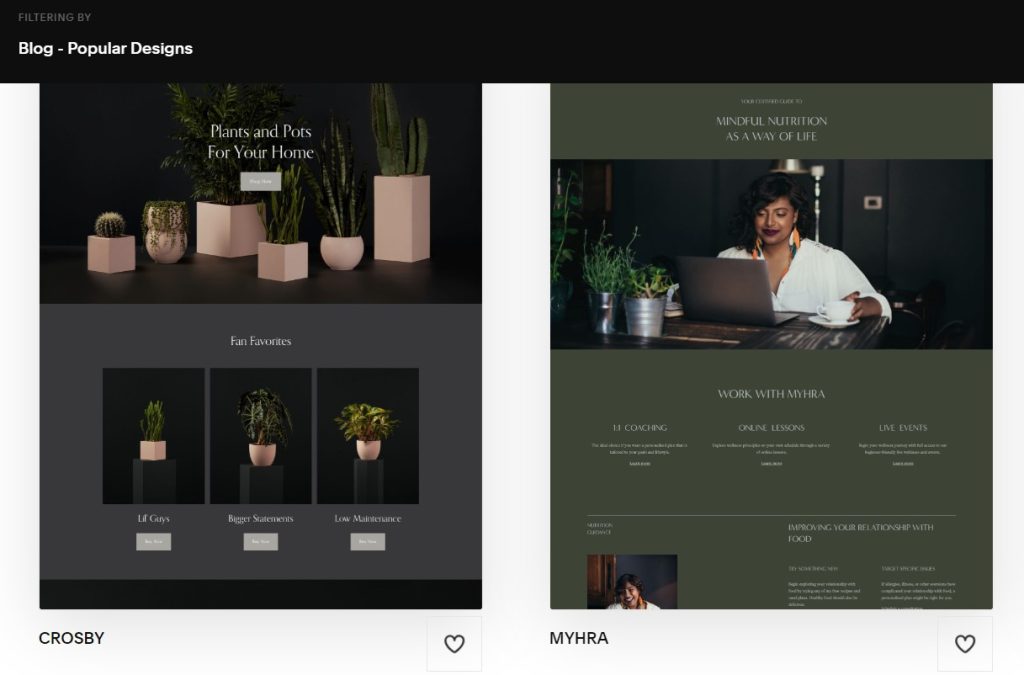
- Squarespace: If you prioritize ease of use and a user-friendly interface, Squarespace is a great option. They offer drag-and-drop functionality, which means you can create your blog’s layout visually, without needing any coding knowledge. Squarespace also comes with a variety of beautiful pre-designed templates to get you started quickly.
- Blogger: This free platform from Google is a fantastic option for those just starting out. Blogger is super easy to use and integrates seamlessly with other Google products like Google Drive and YouTube. However, Blogger offers less flexibility in terms of design and customization compared to other platforms.
Don’t worry about making the “perfect” choice right away. Many platforms offer free trials, so you can experiment and see which one feels most comfortable for you. In the next section, we’ll delve into the world of blog names and how to choose a catchy one that reflects your brand!
Naming Your Blog: Standing Out from the Crowd
Now that you’ve chosen your platform, it’s time to give your blog a name! Your blog name is like a handshake – it’s the first impression you make on your audience. It should be catchy, memorable, and reflect the essence of your niche.
Here are some tips for choosing a winning blog name:
- Keep it relevant: Your blog name should give readers a good idea of what your blog is about. For example, if you’re writing about travel, a name like “The Wandering Wanderlust” would be a good fit.
- Make it memorable: Short, sweet, and easy to pronounce is key. Avoid overly complex names or words with tricky spellings.
- Check for availability: Before you get too attached to a name, do a quick Google search and make sure it’s not already in use by another blog or website. You can also use a domain name checker tool to see if the corresponding domain name (.com, .org, etc.) is available for registration.
- Get creative: Don’t be afraid to have a little fun with your blog name! You can use wordplay, alliteration, or even invent a catchy portmanteau (think “smog” for smoke and fog).
- Consider your brand: Your blog name is a cornerstone of your brand identity. Choose a name that you can see yourself using for years to come, and that reflects the overall tone and style of your blog.
Here are some additional things to keep in mind:
- Avoid hyphens and numbers: These can make your blog name harder to remember and type.
- Think long-term: While your niche might be specific now, consider if the name allows room for growth in the future.
- Get feedback: Run your name ideas by friends, family, or even online communities to see what resonates.
In the next section, we’ll tackle the slightly technical world of setting up your blog, but don’t worry, we’ll break it down into easy-to-understand steps!
Setting Up Your Blog: Getting Technical (but not really!)
We’ve arrived at the part that might seem a bit scary – setting up the technical side of your blog. This is actually a much simpler process than you might think.
Here’s a breakdown of the key steps involved:
Domain Name: This is the unique web address that people will type in to find your blog. Ideally, it should be the same as your blog name (if available). You can register your domain name through a domain name registrar like Namecheap. However, most website hosting companies like Bluehost would let you buy both domains and web hosting all in one.
Web Hosting: This is the service that stores your blog’s files and makes it accessible to visitors on the internet. There are many web hosting providers out there, offering plans at various price points. For beginners, there are affordable shared hosting options that are perfectly sufficient.
Installing Your Blog: Once you have your domain name and web hosting secured, the actual process of installing your blog will vary depending on the platform you choose. Most platforms offer user-friendly installation wizards that will guide you through the steps.
For WordPress, you’ll typically have to find a ‘one-click wordpress installation area’ in your backend. Most website hosting services have simple tutorials on how to do this. Here is an example from bluehost.
Buying Web Hosting with Bluehost: A Beginner’s Guide
Let’s walk through the process of purchasing web hosting with Bluehost, a popular and beginner-friendly option. Here’s a step-by-step breakdown:
Visit the Bluehost website. Bluehost offers several shared hosting plans, all suitable for beginners. The most basic plan, “Basic,” is a good starting point. It allows you to host one website and comes with a free domain name for the first year.
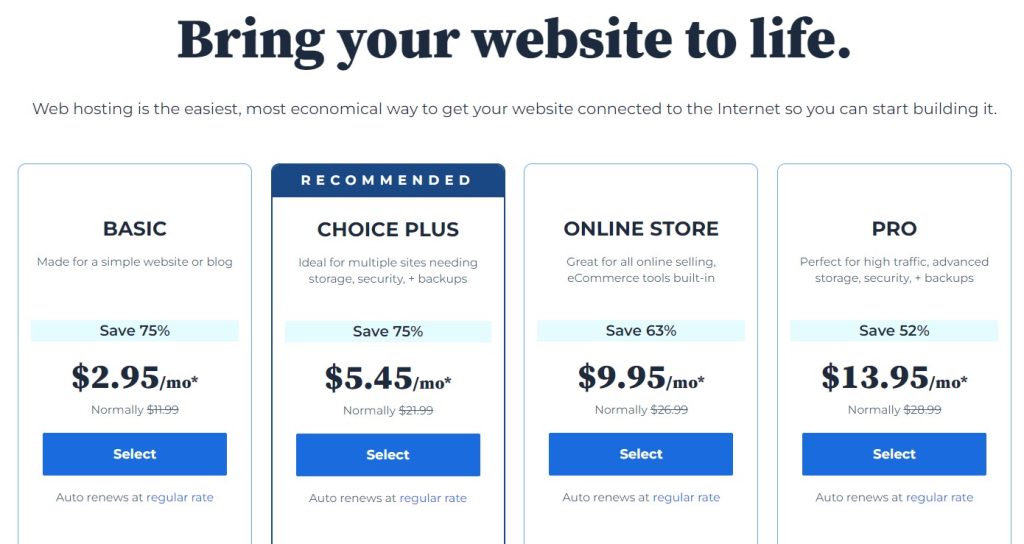
Select Your Domain Name (or Transfer an Existing One): During checkout, you’ll have the option to register a new domain name for your blog. If you already have a domain name registered elsewhere, you can transfer it to Bluehost as well.
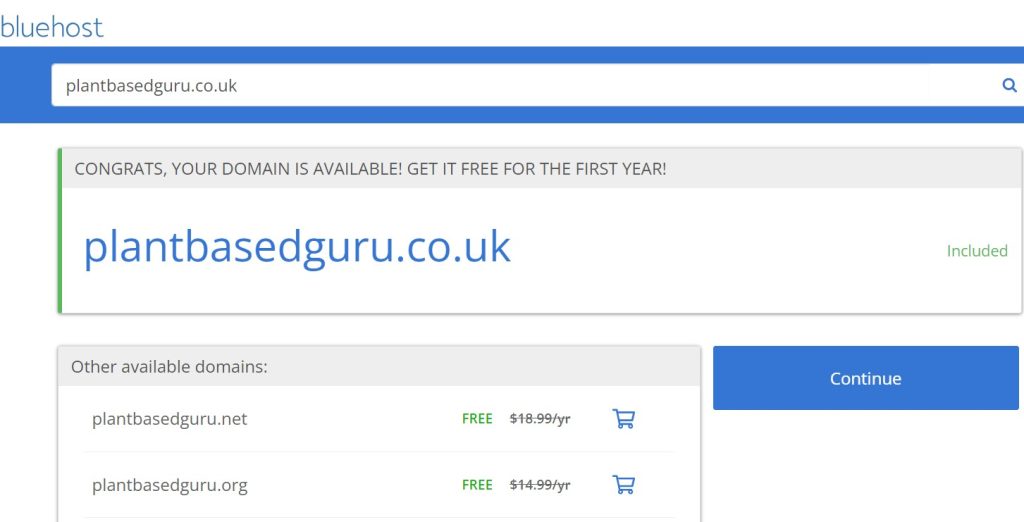
Create Your Account and Checkout: Once you’ve selected your plan, domain name, and billing term, you can proceed to create your Bluehost account. This will involve filling in your contact information and choosing a password. Finally, review your order and complete the checkout process using your preferred payment method.
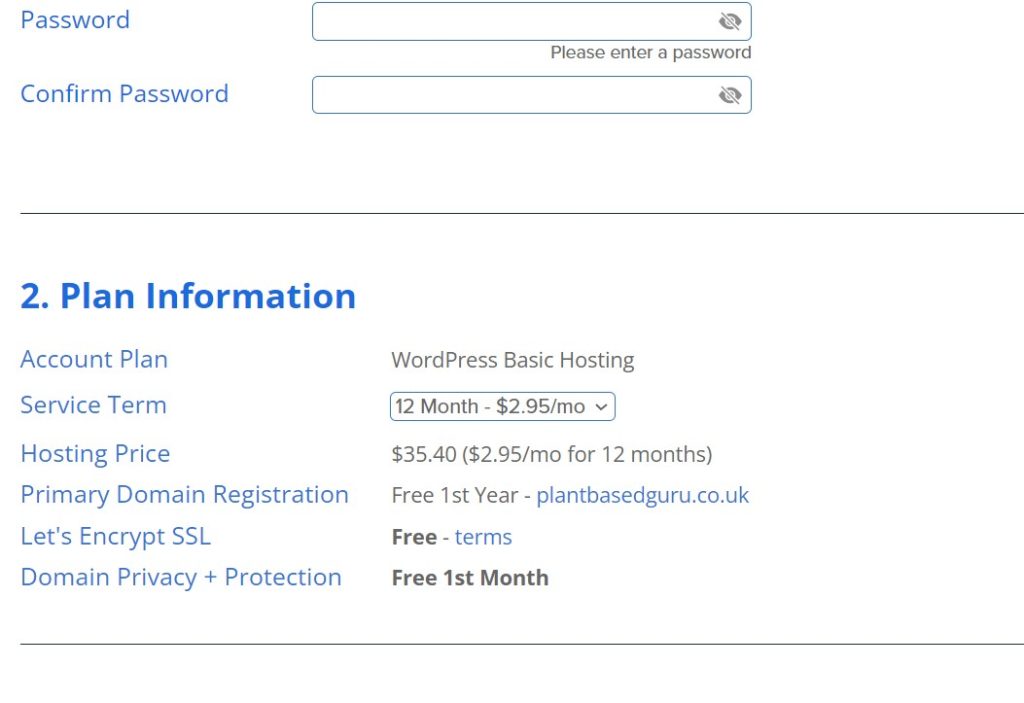
Choosing Your Billing Term: Bluehost offers various billing terms, with longer terms typically offering a discount. However, for beginners, it might be wise to start with a shorter term (12 months) to get comfortable with the platform.
Once you are logged in you can set up your WordPress installation by clicking on ‘login to WordPress,’ adding the necessary information, then accessing your website from the ‘websites’ section of your dashboard.
Designing Your WordPress Blog: Building a Beautiful Home for Your Content
Since we’re focusing on WordPress for this guide, let’s delve into how to design a visually appealing blog using this powerful platform. After all, a well-designed blog not only looks great, but it also creates a positive user experience, keeping your readers engaged and coming back for more.
A Glimpse into the WordPress Dashboard:
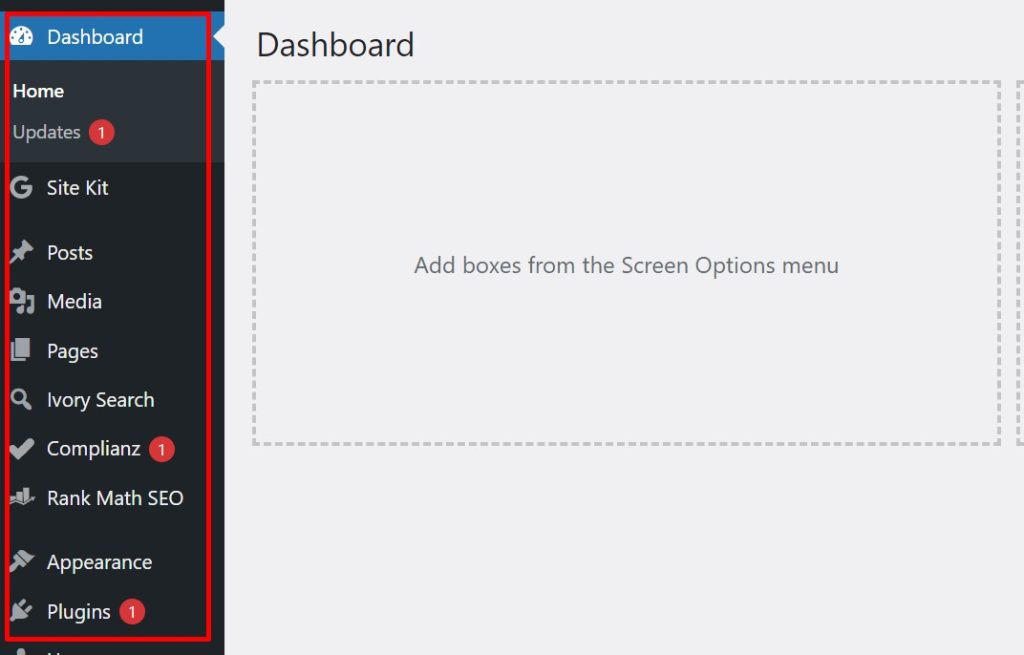
Once you’ve chosen your theme and installed it on your WordPress site, you’ll be working within the WordPress dashboard, which you will also be able to access from ‘yourwebsitedomainname.com/wp-admin/‘, which is your central hub for managing all aspects of your blog. Here’s a basic overview for beginners:
Navigation Menu: This vertical menu on the left side of your screen provides access to all the functionalities you’ll need, such as creating posts, managing pages, customizing themes, and installing plugins (more on that later).
Content Area: This is the central area where you’ll create and edit your blog posts, pages, and other content.
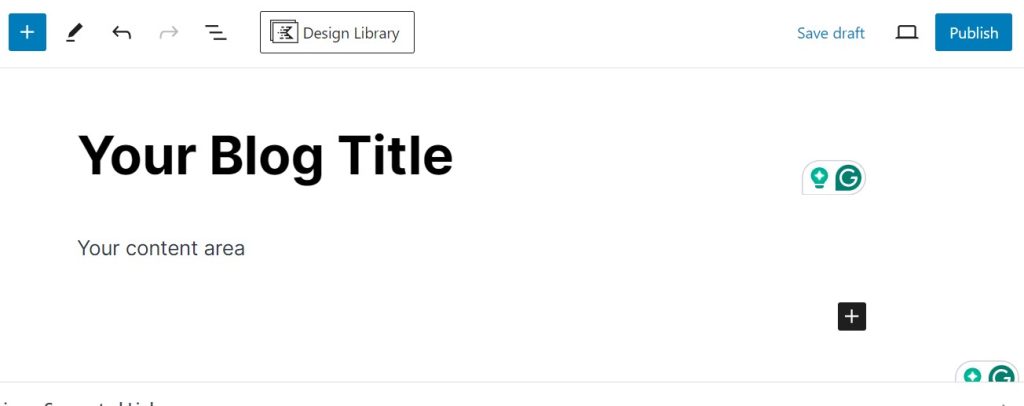
Here is an excellent article explaining the difference between posts and pages.
Widgets: These are customizable modules that can be added to your sidebar or other areas of your blog to display information like recent posts, categories, or social media feeds.
Essential Pages for Your WordPress Blog:
A well-structured website guides visitors seamlessly and provides them with the information they seek. Here are some key pages to consider for your WordPress blog:
- Homepage: This is your digital storefront, the first impression visitors get. It should be visually appealing, easy to navigate, and provide a clear overview of your blog’s content and purpose.
- About Us: Tell your story! This page allows you to connect with your audience on a personal level. Introduce yourself, your expertise, and the passion behind your blog.
- Contact Us: Make it easy for visitors to reach you. Include your email address, a contact form, or links to your social media profiles.
- Blog: This is the heart of your website, where you’ll publish your amazing content. Ensure your blog section is well-organized and easy to navigate by category, tags, or date.
You can create your essential pages by heading to Pages > Add a new page, then adding these to your navigation by heading to Appearance > Menus. Here is a detailed tutorial:
Additional Pages (Optional):
- Services: If you offer any services related to your niche, this page is a great way to showcase what you do and how you can help potential clients.
- Portfolio: For creative bloggers (photography, design, writing), a portfolio page allows you to showcase your best work and impress potential clients or collaborators.
- Privacy Policy & GDPR Compliance: Depending on your location and the nature of your blog, you might need to include a privacy policy outlining how you collect and use visitor data. For users in the European Union, you’ll want to ensure compliance with the General Data Protection Regulation (GDPR).
WordPress Themes and Plugins: Powering Up Your Blog
Now that your website’s foundation is laid out, let’s explore how themes and plugins can enhance your WordPress blog.
Think of themes as the visual canvas of your blog. They determine the overall layout, colours, fonts, and style of your website. WordPress offers a vast selection of themes, both free and paid, catering to different tastes and needs.
Here’s a quick rundown on choosing the perfect theme:
- Mobile-First Design: Ensure your theme is responsive, meaning it adjusts its layout for optimal viewing on all devices.
- Customization Options: Consider how much you want to personalize your theme. Free themes offer limited options, while paid themes might come with drag-and-drop builders for easy customization.
- Readability is Key: Don’t compromise clarity for aesthetics. Choose a theme with clear and easy-to-read fonts on a contrasting background.
Top Themes for Beginners:
Here are some popular and beginner-friendly themes known for their ease of use, customization options, and beautiful designs:
Astra: A lightweight and versatile theme, perfect for beginners. It’s fast-loading, SEO-friendly, and offers a plethora of customization options.
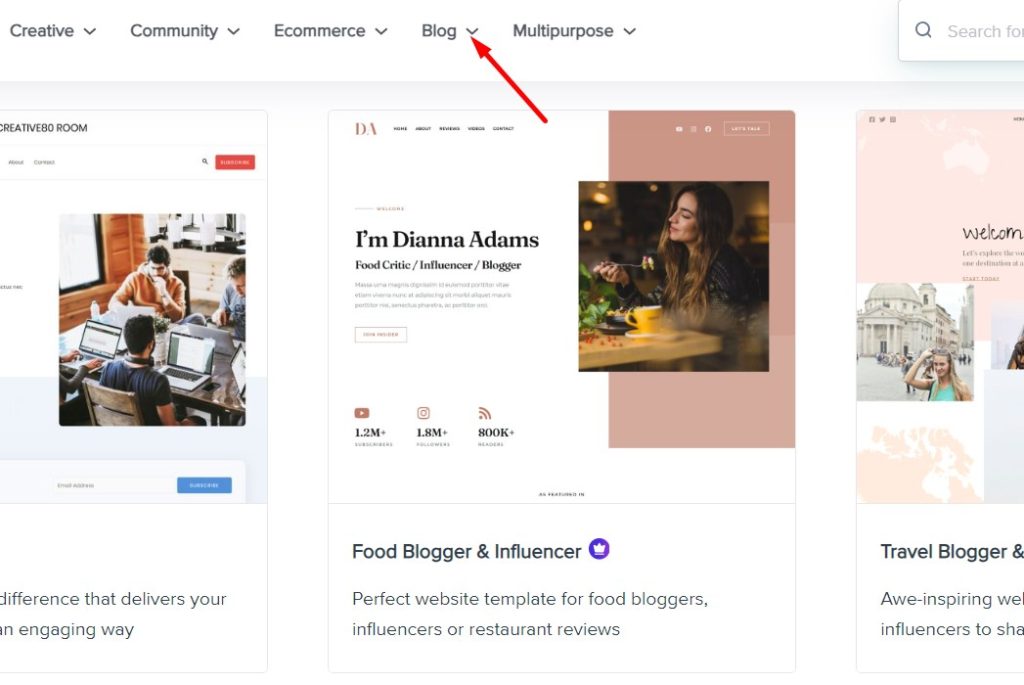
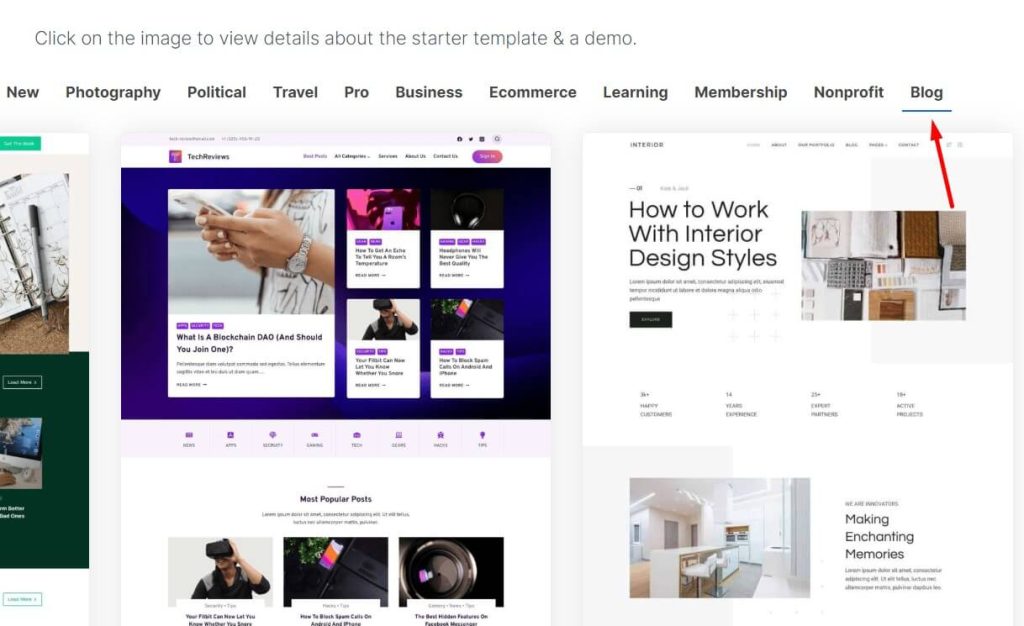
Kadence: Another lightweight option with a drag-and-drop builder for easy customization. Kadence is known for its clean design and fast loading times.
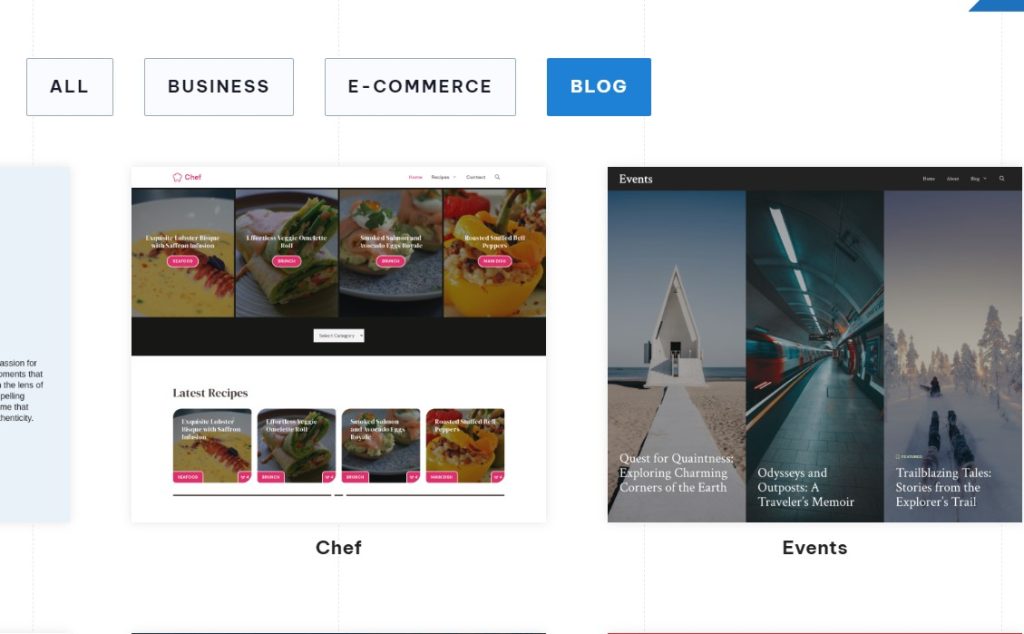
GeneratePress: A lightweight theme known for its speed and performance. GeneratePress offers a good balance of simplicity and customization options.
Installing a Theme on WordPress:
Installing a theme on WordPress is a breeze. Here’s a basic overview:
- Navigate to Appearance > Themes in your WordPress dashboard.
- Click on “Add New” to browse the theme directory or upload a pre-purchased theme.
- Choose your desired theme and click “Install.”
- Once installed, click “Activate” to apply the theme to your website.
Plugins: Adding Functionality to Your Blog
Plugins are like mini-applications that extend the functionality of your WordPress blog. There are plugins for almost everything imaginable, from SEO optimization to contact forms and social media integration.
Here’s a quick rundown on choosing the right plugins:
- Start with the essentials: Don’t overwhelm your website with too many plugins. Focus on essential functionalities you need, like SEO optimization, contact forms, and security.
- Read reviews and ratings: Before installing any plugin, check user reviews and ratings to ensure its compatibility with your WordPress version and positive user experiences.
Essential Plugins for Your WordPress Blog:
Building on the previous point, here are some essential plugins to consider for your WordPress blog, categorized by their function. You can upload plugins by navigating to Plugins > add new plugin > upload.
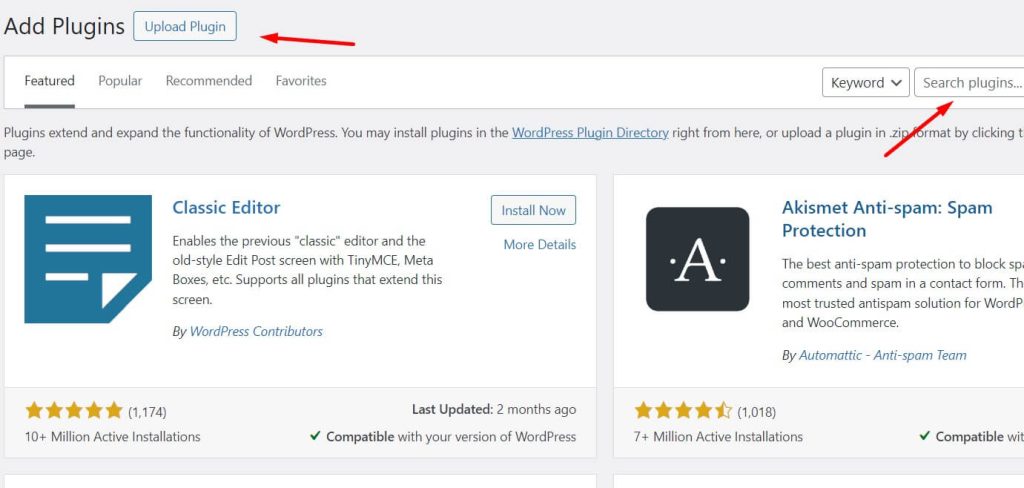
SEO (Search Engine Optimization):
- Squirly SEO: A popular and user-friendly plugin that helps you optimize your content for search engines.
- Rank Math SEO: Another excellent option offering similar functionalities. It now offers an AI tool that helps you automatically generate content such as meta titles and meta descriptions.
Contact Forms:
- WPForms: A drag-and-drop form builder that allows you to create beautiful and easy-to-use contact forms for your website.
Backups:
- Solid Backups: A reliable plugin that allows you to easily backup your entire website and restore it if needed.
Security:
- Solid Security (Formerly iThemes Security): A comprehensive security plugin that protects your website from malware, hacking attempts, and other threats.
Appointment Booking (Consultants):
- Amelia WP: A great option for beginners to get started with appointment booking. With Amelia WP, users can book appointments and can pay to schedule appointments with you. Here are more features.
Remember, it’s wise to start with a few essential plugins and add more as your blog grows and your needs evolve.
Writing Engaging Blog Posts: Captivate Your Audience and Keep Them Coming Back
Now that you’ve built a beautiful and functional website, it’s time to fill it with the lifeblood of any blog – captivating content. Remember, high-quality, informative, and engaging blog posts are what will attract readers, establish you as an authority in your niche, and ultimately make your blog a success.
Finding Your Niche’s Hot Topics
The first step is to brainstorm topics that resonate with your target audience. Relevance is key – you want to write about things your readers genuinely care about and find valuable. Conduct some niche-specific research to see what’s trending in your field. Online communities, forums, and social media groups are excellent places to discover what discussions are happening and what questions people are asking.
Understanding relevant keywords can also be a goldmine for topic ideas. Keywords are the terms people use to search for information online. By incorporating relevant keywords into your content, you increase your chances of appearing in search engine results when people search for those topics. There are affordable keyword research tools like Keysearch and SE Ranking that can help you identify high-value keywords with good search volume. Try searching some niches or keyword ideas below to try SE Ranking.
Crafting Titles That Grab Attention
Your blog post title is like a movie trailer – it needs to be enticing enough to grab attention and make readers want to click. Clarity and conciseness are crucial. The title should accurately reflect the content of your post, but it should also be interesting and spark curiosity. Consider using strong verbs, intriguing questions, or numbers to pique the reader’s interest.
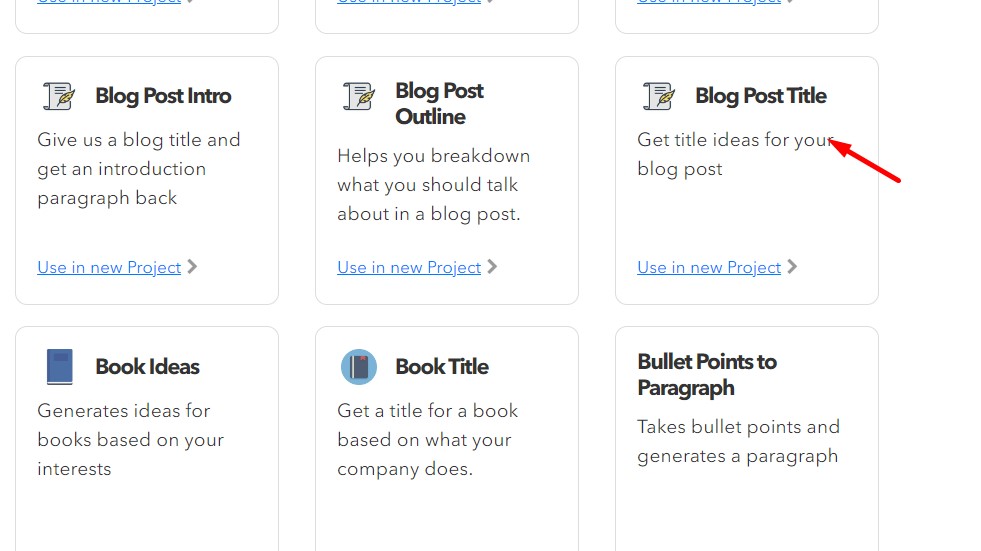
For example, instead of a straightforward title like “The Benefits of Using Email Marketing,” a more captivating option could be “Boost Your Sales: 5 Proven Email Marketing Strategies for [Your Niche].” There are also AI-powered title generators available, such as Nichesss’s Blog Post Title Generator that can provide creative suggestions based on your chosen keywords.
Building Content that Flows and Engages
Once you have a captivating title and a solid understanding of your topic, it’s time to craft the content itself. Here’s where your expertise and passion for your niche come into play. Strive to provide valuable information and insights that educate and engage your readers.
Structure your content with clear headings, subheadings, and short paragraphs to improve readability. Don’t underestimate the power of visuals! High-quality images, infographics, or videos can break up long stretches of text and make your content more visually appealing.
Write in a clear, concise, and engaging style. Inject your personality and unique voice to connect with your audience on a deeper level. Remember, people don’t just read content, they connect with the person behind it.
Finally, ensure your content is polished and error-free. Typos and grammatical mistakes can create a negative impression. Take the time to proofread your work carefully before hitting publish.
Promoting Your Blog and Reaching New Audiences
Crafting captivating content is just the first step. To truly establish yourself as a thought leader and build a thriving blog, you need to get your content seen by the right people. Here are some effective strategies to spread the word and broaden your audience reach:
The Power of Social Media Marketing:
Social media platforms like Facebook, Twitter, Instagram, and Pinterest are a goldmine for connecting with potential readers. Regularly share your blog posts, engage in relevant conversations, and join niche-specific communities. Offer valuable insights, answer questions, and participate in discussions to showcase your expertise. Content-sharing platforms like Medium and LinkedIn can also be valuable tools to publish your content and reach a wider audience within your field.
Optimizing for Search Engines:
Remember keyword research from earlier? Here’s where it pays off. By strategically integrating relevant keywords throughout your content, you increase your chances of ranking higher in search engine results pages (SERPs). Craft compelling meta descriptions – those short snippets that appear under your title in search results – to entice users to click. There are also plugins like Rankmath that can help ensure your website adheres to best practices for search engine optimization.
Building Relationships Through Email Marketing:
Encourage your readers to subscribe to your email list. This allows you to nurture your audience by providing valuable content and insights through your email newsletter. A loyal and engaged subscriber base is key to long-term success.
Can Collaboration Work?
Network and connect with other bloggers, influencers, and businesses in your niche. Explore guest blogging opportunities – a fantastic way to share your expertise with a new audience and gain valuable backlinks to your website. Consider co-creating content, hosting webinars, or running social media campaigns together. Collaboration is a powerful tool for expanding your reach and establishing yourself within your niche.
Try Podcasting
Podcasts are a great way to delve deeper into topics and connect with your audience on a more personal level. If you enjoy the audio format, consider launching a podcast to establish yourself as an authority and reach listeners who prefer audio content.
Monetizing Your Blog: Turning Passion into Profit
Once your blog gains traction and attracts a loyal following, you can explore various ways to monetize your passion and turn your blog into a source of income. Here are some popular methods:
- Display Advertising: Partner with ad networks to display targeted ads on your blog, earning revenue whenever a reader clicks on an ad.
- Affiliate Marketing: Promote relevant products or services related to your niche, earning a commission whenever a reader makes a purchase through your affiliate link.
- Selling Digital Products: Create and sell ebooks, courses, templates, or other digital products directly through your blog.
- Freelancing or Consulting: Leverage the expertise you’ve established through your blog to offer freelance writing, consulting, or coaching services to your audience.
- Premium Content: Offer exclusive content, in-depth tutorials, or downloadable resources for a subscription fee.
Remember, building a sustainable income stream takes time and dedication. Focus on creating high-quality content, building trust with your audience, and providing value before diving headfirst into monetization. The key is to create a win-win situation. By offering valuable content and building a strong connection with your readers, you’ll establish a loyal following that’s more receptive to your monetization efforts.
With dedication, creativity, and the strategies outlined in this guide, you can establish a thriving blog, captivate your audience, and potentially turn your passion into a profitable venture. So, start brainstorming captivating content, promote your work strategically, and watch your blog flourish!